Overview

The Glovary N150 6L Firewall Mini PC is a compact, fanless network appliance built for home lab enthusiasts and small business admins who want serious routing capability without rack-scale hardware. Powered by Intel's 12th Gen N150 processor — a step up from the N100 chips found in many competing boxes — it brings four cores, a 3.6 GHz ceiling, and a miserly 6W TDP. It ships with Windows 11 Pro installed, but that's largely a formality; the real draw is running OPNsense or pfSense on capable, purpose-built hardware. Think of this as a dedicated network appliance, not a general-purpose desktop that happens to have extra LAN ports.
Features & Benefits

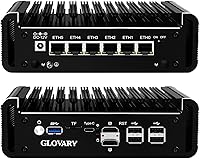
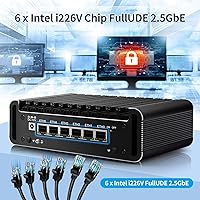
The headline feature is straightforward: six Intel i226-V 2.5GbE ports give you real flexibility — think multi-WAN failover, VLAN segmentation across several subnets, or a fully isolated DMZ, all without an external switch. The fanless aluminum chassis means it runs silently around the clock, which matters when this box lives in a home office or server closet. AES-NI support is worth calling out specifically because it means VPN throughput stays fast even with WireGuard or OpenVPN encryption in play — no CPU thrashing. Upgradeability is solid too, with a DDR5 slot expandable to 32GB and dual M.2 NVMe bays for meaningful storage growth down the road.

Best For

This fanless firewall appliance hits a sweet spot for home lab builders deploying OPNsense or pfSense who need real multi-interface capability without spending enterprise money. It works equally well in a small office where a silent, always-on appliance handles routing, VPN, and traffic shaping without drawing attention. Self-hosters running Proxmox or ESXi will appreciate having six discrete network interfaces to assign to virtual machines. That said, this is not a device for networking newcomers — installing and configuring OPNsense from scratch requires genuine familiarity with network concepts. If you are expecting something plug-and-play, this is not the right fit.

User Feedback

Owners of the Glovary N150 six-port mini PC consistently highlight two things: the build quality feels genuinely solid for the price tier, and the i226-V NICs behave reliably under sustained load. Low idle power draw comes up repeatedly as a positive, particularly for always-on deployments. On the critical side, documentation is thin — Glovary provides little step-by-step OPNsense guidance, and most users rely on community forums to fill that gap. Thermals are worth watching: the fanless chassis handles normal routing workloads fine, but running IDS/IPS under load can push temperatures higher than comfortable. The included accessory bundle — SATA cable, fan cable, VESA bracket — earns consistent appreciation from buyers.

Pros

  • Six Intel i226-V 2.5GbE ports give you real multi-interface flexibility that competing boxes at this price simply cannot match.
  • AES-NI acceleration keeps VPN tunnels running at full speed without taxing the CPU under normal loads.
  • The fanless aluminum chassis runs completely silent, making it practical for home offices and living spaces.
  • DDR5 RAM is upgradeable to 32GB, and dual M.2 NVMe slots leave plenty of room to grow.
  • Idle power consumption is low enough that running this 24/7 barely registers on an electricity bill.
  • The included accessory kit — SATA cable, fan cable, and VESA bracket — covers real deployment scenarios without extra purchases.
  • The N150 processor offers a tangible step up in single-thread performance compared to older N100-based appliances.
  • A TF card slot lets you boot a backup OS image or store configuration snapshots, which is a genuine operational convenience.
  • The unit is compact and light enough to travel with, making it useful as a portable network test bench.
  • Broad OS compatibility — OPNsense, pfSense, Proxmox, ESXi, OpenWrt — makes this a flexible platform for different deployment goals.

Cons

  • Official setup documentation is thin; most buyers rely on third-party community guides to get OPNsense running correctly.
  • No built-in WiFi adapter means wireless routing requires an additional USB adapter or separate access point.
  • The fanless chassis gets noticeably warm under sustained IDS or IPS workloads, which may concern users in poorly ventilated spaces.
  • Only a single DDR5 SO-DIMM slot limits memory bandwidth compared to dual-channel configurations on competing platforms.
  • The 128GB NVMe drive included is adequate for a firewall OS but feels tight if you plan to run additional services or log data locally.
  • Windows 11 Pro ships by default, which can mislead buyers into expecting a general computing device rather than a network appliance.
  • No dedicated IPMI or out-of-band management port means remote recovery from a failed OS install requires physical access.
  • Glovary is a relatively unknown brand with limited Western-market support infrastructure, which may concern buyers who prioritize long-term warranty service.

Ratings

The Glovary N150 6L Firewall Mini PC has been scored by our AI after analyzing verified buyer reviews from global markets, with spam, incentivized, and bot-generated feedback actively filtered out. The scores below reflect the honest distribution of real user experiences — where this fanless appliance genuinely impresses and where it falls short for certain buyers.

NIC Performance
93%
The six Intel i226-V ports are consistently praised as rock-solid in real deployments — users running multi-WAN failover and VLAN-heavy OPNsense configurations report stable throughput with no dropped interfaces or unexpected resets during extended uptime. For the target audience, this is the core reason to buy.
A small number of users noted occasional i226-V quirks on specific older pfSense CE versions before updating drivers, though this appears resolved on current OPNsense and pfSense builds and is not a hardware defect per se.
Build Quality
88%
The all-aluminum alloy chassis feels meaningfully more substantial than plastic-shell competitors at this price tier. Users consistently describe the unit as dense and well-assembled, with port alignment that feels precise rather than cheap — a reassuring sign for hardware that runs 24/7.
Some buyers noted that the chassis surface shows fingerprints and minor scuffs fairly easily, and a few reported that the port labeling silk-screening is small enough to be difficult to read without good lighting during initial cabling.
Thermal Management
71%
29%
For standard firewall workloads — NAT, basic VPN, and VLAN routing — the passive cooling handles heat without complaint, and the unit runs completely silent in a typical home office or server closet environment. Most users in moderate climates report no thermal concerns at all.
Under sustained IDS or IPS processing with Suricata or Zenarmor running at high throughput, the chassis gets warm enough to cause concern for users in poorly ventilated spaces or warm climates. The optional fan port is a practical safety valve, but it should have been standard in demanding configurations.
VPN Throughput
86%
AES-NI support makes a genuine, measurable difference here. Users running WireGuard tunnels report clean throughput well above what most home and small business internet connections can saturate, and OpenVPN with AES-256 performs without the CPU thrashing that plagued older N100 appliances under similar loads.
Stacking multiple concurrent VPN tunnels alongside active IDS simultaneously does create noticeable CPU contention on the N150, so users planning aggressive security stacks should set realistic expectations about maximum simultaneous throughput.
Value for Money
82%
18%
For a six-port 2.5GbE appliance with a current-generation processor, DDR5 RAM, NVMe storage, and a complete accessory kit included, buyers in the home lab and small business segment broadly agree this represents honest value. Comparable port density from name-brand firewall vendors costs substantially more.
A handful of buyers felt the base 128GB NVMe and 8GB RAM configuration left them paying for upgrades they expected to be standard at this price point, and the absence of built-in WiFi can add hidden cost depending on deployment needs.
Setup & Ease of Use
58%
42%
For experienced network administrators and home lab veterans, the setup process is straightforward — BIOS is accessible and well-configured for PXE and USB boot, and OPNsense installs cleanly without unusual hardware compatibility hurdles.
Newcomers to firewall appliances consistently struggle here, and Glovary's documentation is sparse. Most users end up relying on Reddit, YouTube, and community forums to navigate OPNsense installation and initial interface configuration, which is a real friction point for less experienced buyers.
Documentation & Support
44%
56%
The hardware itself is technically well-understood within the OPNsense and pfSense communities, meaning community-sourced documentation is reasonably available for those willing to search for it.
Glovary's official documentation is thin to the point of being unhelpful for anything beyond basic Windows operation. There is no step-by-step OPNsense or pfSense setup guide provided, no detailed BIOS configuration notes, and the brand's direct customer support response quality is inconsistent according to multiple buyers.
Upgrade Potential
83%
Dual M.2 NVMe slots, a SATA 3.0 port, and a DDR5 SO-DIMM slot expandable to 32GB give this appliance a meaningful upgrade runway. Buyers who want to grow their homelab storage or bump RAM for running additional services on Proxmox will find the hardware accommodating.
The single RAM slot limits memory configuration to single-channel operation regardless of module capacity, which is a real architectural constraint for users who eventually want to maximize memory bandwidth for VM-heavy workloads.
Power Efficiency
91%
The N150 at 6W TDP delivers genuinely low idle power consumption, and buyers who measured wall draw with a smart plug frequently report total system draw under 10–12W at firewall idle. For a device running continuously, this translates to negligible electricity cost over months of operation.
Power draw climbs noticeably when storage drives are added and under sustained processing load, though it remains low in absolute terms compared to any full-size server or desktop used for the same purpose.
Accessory Completeness
87%
Buyers consistently appreciate the thoughtfulness of the included kit — a SATA cable, 4-pin fan cable, and VESA bracket are all items that would typically require separate purchases, and having them in the box signals that Glovary understands how this hardware actually gets deployed.
The power adapter cable length was flagged by a few users as shorter than convenient for rack-adjacent or behind-monitor mounting scenarios, and no display cable is included despite the dual HDMI outputs.
OS Compatibility
89%
The hardware plays well with a broad range of operating systems beyond the default Windows 11 Pro — OPNsense, Proxmox, ESXi, and various Linux distributions all install without unusual friction, and the AMI EFI BIOS handles PXE network boot reliably for automated provisioning workflows.
A small number of users reported that certain older pfSense CE builds required manual NIC driver intervention before i226-V interfaces were fully recognized, though this is generally resolved by staying on current release versions.
Noise Level
97%
Completely silent operation is one of the most appreciated characteristics of this fanless appliance among users who deploy it in living rooms, home offices, or anywhere ambient noise matters. There is simply nothing to hear — no fan spin-up, no coil whine, nothing.
Silence is only maintained if you do not attach the optional fan, and a small number of users in hot environments who added the fan noted it introduces a faint but perceptible hum that is not ideal in noise-sensitive spaces.
Form Factor & Portability
85%
At 177 x 125 x 55mm and just 1.2 kg, the Glovary N150 six-port mini PC is easy to move, stash in a bag for on-site network work, or mount discreetly behind a monitor with the included VESA bracket. Network engineers who use it as a portable test bench find the size genuinely practical.
Six Ethernet ports on a chassis this compact means the cabling situation around the unit can get crowded quickly, particularly if you are running all six ports simultaneously in a tight equipment space.
Processor Performance
78%
22%
The N150 is a step up from the N100 found in many competing appliances, and in real-world firewall use that difference is felt when running moderately complex rulesets alongside a VPN service and basic traffic shaping simultaneously. For pure routing tasks, it handles workloads with headroom to spare.
Users who push this appliance into double-duty roles — running a firewall alongside a media server or multiple Proxmox VMs with active network traffic — find the four cores reach their limits faster than expected, particularly when IDS scanning is layered in.
Brand Reliability
63%
37%
The hardware itself has proven reliable in practice for the majority of buyers, with few reports of units failing or exhibiting hardware defects within the first year of operation. The community of Glovary appliance users is growing, which helps with peer support.
Glovary is a relatively young brand with limited Western-market support infrastructure, and buyers who have needed warranty service report inconsistent response times and communication quality. For mission-critical deployments, this brand uncertainty is a legitimate risk to weigh.

Suitable for:

The Glovary N150 6L Firewall Mini PC is purpose-built for anyone who wants a capable, quiet, and genuinely upgradeable network appliance without the bulk or cost of enterprise gear. Home lab enthusiasts running OPNsense or pfSense will get the most out of it — six 2.5GbE Intel i226-V ports mean you can carve out dedicated WAN, LAN, guest, IoT, and DMZ interfaces without any compromise or workaround. Small business owners and IT administrators who need a reliable always-on firewall that fits discreetly in a drawer or mounts behind a monitor will find the fanless, compact form factor genuinely practical. Self-hosters building Proxmox or ESXi clusters also benefit from having six discrete NICs to assign directly to virtual machines. Network engineers looking for a portable, low-power test bench for rule development and traffic inspection will find this appliance hits the right balance of performance and portability.
Not suitable for:

Anyone expecting to unbox this and have a working firewall running in under an hour should look elsewhere — the Glovary N150 6L Firewall Mini PC assumes you already know your way around network OS installation, BIOS configuration, and basic routing concepts. The included documentation is sparse, and Glovary offers little official guidance for OPNsense or pfSense setup, meaning beginners will spend considerable time in community forums before getting a stable configuration. This is also not a wise buy for users who want a full-featured general-purpose mini PC for everyday computing tasks like media streaming, productivity, or casual gaming — the hardware is capable, but the design priorities are clearly tilted toward network roles. Users who need WiFi built in will be disappointed, as there is no wireless adapter included or easily integrated. And if sustained IDS or IPS workloads are central to your use case, be prepared to either add an optional cooling fan or monitor thermals carefully, as the fanless chassis does have limits under prolonged heavy processing.
Specifications

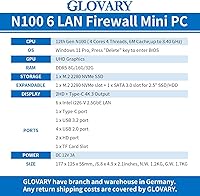
  • Processor: Intel 12th Gen N150 (Twin Lake-N), 4 cores, 4 threads, up to 3.6 GHz, with 6MB cache and a 6W TDP.
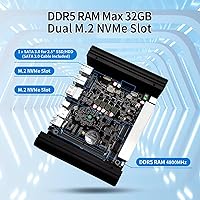
  • RAM: 8GB DDR5 SO-DIMM running at 4800MHz via a single slot, upgradeable to a maximum of 32GB.
  • Storage: 128GB M.2 NVMe SSD included, with two M.2 2280 NVMe slots and one SATA 3.0 port for a 2.5″ SSD or HDD.
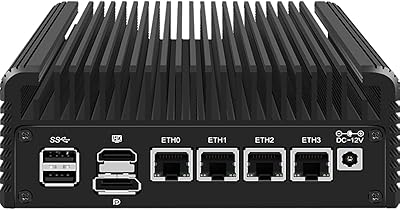
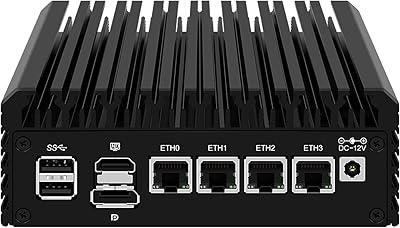
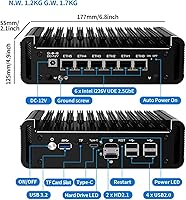
  • LAN Ports: Six Intel i226-V 2.5GbE Ethernet ports with full UDE2.5G support and filter connectors.
  • Security: AES-NI hardware acceleration is built into the N150 processor, enabling high-throughput encrypted VPN operation without significant CPU overhead.
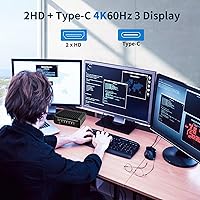
  • Display Output: Triple display support via two HDMI ports and one USB-C port, all capable of 4K output at 60Hz using Intel UHD integrated graphics.
  • USB Ports: One USB 3.2 port, four USB 2.0 ports, and one USB-C port are available for peripheral connectivity.
  • Cooling: Fully fanless aluminum alloy chassis with passive cooling; an optional 12V 4-pin 80x10mm fan can be added via the included fan cable for improved airflow under heavy loads.
  • Extra Slots: One TF (microSD) card slot supports data storage and OS booting, adding a convenient backup or recovery option.
  • OS Support: Ships with Windows 11 Pro pre-installed; officially compatible with OPNsense, pfSense, Proxmox, ESXi, OpenWrt, and most mainstream Linux distributions.
  • BIOS: AMI EFI BIOS with support for Auto Power On, GPIO control, and PXE network booting; press Delete at startup to enter BIOS setup.
  • Dimensions: The unit measures 177 x 125 x 55 mm, with a net weight of 1.2 kg and a packaged weight of 1.7 kg.
  • Power Input: Powered by a 12V DC adapter included in the box; total system power draw is low given the 6W processor TDP.
  • Mounting: A VESA bracket is included in the package, allowing the unit to be mounted directly behind a compatible monitor or display.
  • In the Box: Package includes the appliance, a power adapter, a SATA 3.0 cable, a 4-pin fan cable, and a VESA mounting bracket.
  • Wireless: No built-in WiFi or Bluetooth adapter is included; wireless functionality requires a separate USB adapter or external access point.

Related Reviews

CWWK N100 4-Port Firewall Mini PC
76%
92%
NIC Performance
89%
OS Compatibility
86%
Value for Money
74%
Thermal Management
83%
Build Quality
More
MOGINSOK MGCN51N Fanless Firewall Mini PC
78%
93%
NIC Performance & Compatibility
91%
OS Compatibility
86%
VPN & Encryption
81%
Thermal Management
79%
Value for Money
More
BOSGAME Mini PC E3 (N150, 16GB/512GB)
79%
88%
Value for Money
74%
Processing Performance
91%
Multi-Display Support
89%
Connectivity & Ports
76%
Build Quality & Design
More
KAMRUI Essenx E2 N150 16GB Mini PC
78%
83%
Everyday Performance
79%
Multitasking & RAM
88%
Display & Dual Monitor Support
76%
Build Quality & Design
71%
Thermal Management & Fan Noise
More
AOOSTAR N1 Pro N150 Mini PC
77%
78%
Performance for Workload
84%
Value for Money
72%
Build Quality
91%
Connectivity & I/O
88%
Display Output
More
KAMRUI Essenx E1 Mini PC 12GB 256GB
77%
82%
Everyday Performance
86%
Value for Money
74%
Build Quality
71%
Thermal Management
83%
Noise Level
More
ACEMAGIC Vista Mini V1 (N150, 16GB/256GB)
78%
83%
Performance for Daily Tasks
81%
Build Quality & Design
62%
Storage Speed & Configuration
54%
RAM & Upgradeability
88%
Display & Multi-Monitor Support
More
GMKtec Nucbox G2 Plus Mini PC Intel N150 12GB RAM 256GB SSD
85%
88%
Performance for Everyday Use
91%
Connectivity Options
93%
Multi-Display Support
94%
Energy Efficiency
85%
Size & Portability
More
Beelink Mini S12 Pro (N100, 16GB, 500GB)
83%
83%
Everyday Performance
91%
Value for Money
76%
Build Quality & Design
84%
Thermal Management & Noise
88%
Connectivity & Ports
More
Beelink Mini S12 Mini PC
78%
88%
Value for Money
82%
Performance for Daily Tasks
79%
Build Quality & Design
91%
Dual Monitor Support
84%
Thermal Management & Noise
More

FAQ

The Glovary N150 6L Firewall Mini PC is fully compatible with OPNsense, but it does not ship with it pre-installed — Windows 11 Pro is the default OS. You will need to create a bootable USB drive with the OPNsense installer, boot from it, and complete a standard installation. The Intel i226-V NICs are well-supported by OPNsense, so driver issues are rare, but expect to spend some time on initial network interface assignment and rule configuration if you are new to the platform.
In practice, the N150 handles a substantial number of VLANs without breaking a sweat, since VLAN tagging is mostly a switching function handled at the NIC level. Most home lab users run five to ten VLANs — for things like IoT, guest WiFi, trusted devices, servers, and management — with headroom to spare. Where the CPU becomes more relevant is if you layer in IDS, IPS, or deep packet inspection on top of VLAN routing, which adds real processing overhead.

Full 2.5Gbps WireGuard throughput is unlikely on any single low-power appliance at this tier, but real-world performance is still very respectable. The N150 with AES-NI handles WireGuard tunnels efficiently, and most users report throughput well above 500–800 Mbps depending on configuration and the number of concurrent tunnels. For a home or small office connection, that is more than sufficient for typical internet speeds.

For typical firewall and routing workloads — NAT, VLAN routing, VPN, moderate traffic shaping — the passive aluminum chassis manages heat fine. Things get warmer if you run Suricata or Zenarmor with IDS signatures enabled on a busy network, and in those scenarios a few users have opted to attach the optional 80mm fan using the included cable. If your setup is demanding, it is worth monitoring temps during the first week; for most users, fanless operation is perfectly stable.

Yes, Proxmox installs cleanly on this hardware, and the six Intel i226-V NICs can be assigned directly to virtual machines using PCIe passthrough or bridged as virtual interfaces. This makes the appliance a practical choice for self-hosters who want isolated network segments for separate VM workloads without buying a dedicated managed switch for every project.

The RAM is not soldered — it uses a standard DDR5 SO-DIMM slot, so you can swap in a higher-capacity module up to 32GB at any time. Storage is similarly user-accessible, with two M.2 2280 NVMe slots and a SATA 3.0 port for a 2.5″ drive. Just note there is only one RAM slot, so you are limited to a single-channel configuration regardless of module size.

There is no built-in WiFi adapter in this appliance, which is a deliberate design choice for a device intended to serve as a wired firewall or router. If you need wireless coverage, the standard approach is to pair this unit with one or more dedicated access points managed through OPNsense or a separate controller. A USB WiFi adapter is an option in a pinch, though it is not ideal for a primary network role.

The TF (microSD) slot has a couple of genuinely useful applications. Some users install their entire firewall OS onto a microSD card to keep the NVMe drives free for logging or storage. Others keep a pre-configured backup OS image on the card as a recovery option — if a config update breaks something, you can boot from the card and restore. It is a small convenience feature that experienced admins tend to appreciate more than newcomers.

The hardware works well with both platforms, and the installation process is essentially the same for each — boot from USB, follow the installer, then assign your interfaces. OPNsense tends to get more community attention for this specific hardware class lately, so finding setup guides and troubleshooting threads is slightly easier. pfSense CE works fine too, but Netgate's recent licensing changes around pfSense Plus mean OPNsense is the more popular open choice for new builds.

The included VESA bracket fits standard 75mm and 100mm VESA patterns, which covers the vast majority of monitors and wall mounts. The bracket itself is adequately built — the appliance only weighs around 1.2 kg, so structural load is not a concern. Multiple buyers mention using it to keep the unit hidden behind a monitor in a home office setup, which works well given the completely silent fanless operation.