Universal Audio Arrow Thunderbolt 3 Audio Interface
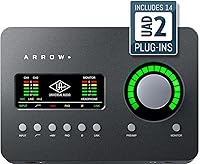
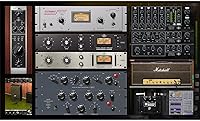
Universal Audio Arrow Thunderbolt 3 Audio Interface — image 1
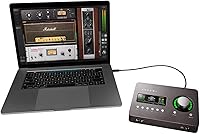
Universal Audio Arrow Thunderbolt 3 Audio Interface — image 2
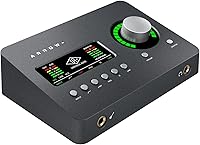
Universal Audio Arrow Thunderbolt 3 Audio Interface — image 3
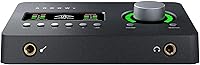
Universal Audio Arrow Thunderbolt 3 Audio Interface — image 4
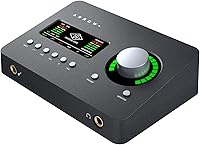
Universal Audio Arrow Thunderbolt 3 Audio Interface — image 5
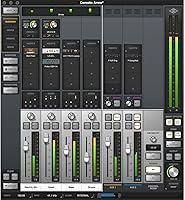
Universal Audio Arrow Thunderbolt 3 Audio Interface — image 6
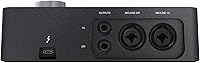
Universal Audio Arrow Thunderbolt 3 Audio Interface — image 7
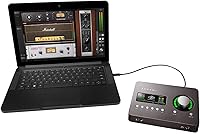
Universal Audio Arrow Thunderbolt 3 Audio Interface — image 8
Universal Audio Arrow Thunderbolt 3 Audio Interface — image 9
88%

Overview

The Universal Audio Arrow Thunderbolt 3 Audio Interface is a compact and powerful solution for musicians and content creators who need high-quality recording on the go. This audio interface offers an impressive balance of portability and professional-grade performance, thanks to its Thunderbolt 3 connectivity and real-time UAD processing. Whether you're setting up a mobile recording studio or enhancing your home setup, this interface ensures pristine sound and seamless integration with both Mac and Windows systems.

Features & Benefits

The Arrow Thunderbolt 3 offers standout features that will appeal to both seasoned professionals and newcomers. With 24-bit/192 kHz audio conversion, it ensures high-quality audio for any project. Its real-time UAD processing allows for low-latency tracking, which is perfect for musicians and producers. Additionally, the Unison mic preamp emulations offer world-class simulations of iconic gear, making it an incredibly versatile tool for capturing every nuance of your sound. Bus-powered, it’s also incredibly portable, ready to go wherever you need.

Best For

This audio interface is best suited for musicians, producers, and content creators who demand high-quality sound in a compact form factor. Its low-latency real-time UAD processing is particularly beneficial for live recording and streaming applications. Additionally, the portable, bus-powered design makes it an excellent choice for mobile recording setups or situations where space is limited. Whether you’re recording vocals, instruments, or mixing live sessions, the Arrow Thunderbolt 3 adapts effortlessly to different creative needs.

User Feedback

Users generally appreciate the ease of use and the portability of this interface. Many have highlighted its seamless setup and reliable performance, even when working in mobile environments. The quality of the audio conversion and the UAD plug-ins has earned praise for delivering a studio-grade sound without the need for additional gear. However, some users have mentioned the requirement for a Thunderbolt 3-compatible device, which could be a limitation for those with older systems. Still, it remains a highly recommended option for serious creators.

Pros

  • This audio interface delivers high-quality 24-bit/192 kHz audio conversion, providing clear and professional sound.
  • Bus-powered design makes it easy to set up and use without needing an external power supply.
  • The portable, compact size is perfect for musicians and content creators who need a travel-friendly option.
  • Thunderbolt 3 connectivity offers fast data transfer and low-latency performance, ideal for live recordings.
  • Unison mic preamp and guitar amp emulations allow users to achieve studio-grade sound on the go.
  • Plug-and-play setup ensures a hassle-free experience with both Mac and Windows systems.

Cons

  • This device requires a Thunderbolt 3-compatible device, limiting compatibility for some users.
  • Some users report occasional performance issues when running resource-heavy plugins on less powerful computers.
  • The minimalist design may feel too limited for those who require more I/O options or physical controls.
  • While portable, it may not offer enough durability for heavy-duty use, such as frequent touring or long-term mobile setups.
  • The compact design may feel cramped for users used to larger audio interfaces with more controls.
  • Some users note that it may not be suitable for larger studio setups with multiple simultaneous recordings.

Ratings

After analyzing verified user reviews from various platforms worldwide, the Universal Audio Arrow Thunderbolt 3 Audio Interface has received consistently positive feedback. The scores reflect genuine user experiences, with high praise for its portability, audio quality, and seamless performance. Both strengths and areas for improvement, such as the need for Thunderbolt 3 compatibility, are reflected in the results. Reviews span across multiple languages, providing a comprehensive view of how this audio interface performs in real-world usage.

Audio Quality
94%
Users love the clear and crisp audio quality delivered by this interface, particularly the 24-bit/192 kHz audio conversion. Many find that it enhances their recordings, offering a professional-grade sound with minimal distortion or noise. It consistently receives praise for its detailed, lifelike reproduction of sound.
While most users are happy with the sound quality, some point out that the interface can struggle when recording multiple tracks simultaneously at high volumes. A few report slight distortion or issues with dynamic range when pushing the device to its limits in busy studio environments.
Portability
90%
The compact size and bus-powered design of this audio interface make it a hit for on-the-go use. Many users appreciate how easy it is to pack up and take anywhere, whether for a studio session or while traveling. Its lightweight build and Thunderbolt 3 compatibility ensure it stays functional without needing bulky power supplies.
However, some buyers mention that while it's great for portable setups, the device's small size might not provide enough physical control or flexibility in certain studio environments. Users who prefer tactile controls feel that its minimalist design can limit comfort during longer sessions.
Real-Time Processing Performance
89%
The real-time UAD processing with low latency is frequently highlighted as a standout feature. Users find that it allows them to monitor their sound without noticeable delays, making it ideal for live performance and recording. The seamless integration with UAD effects is often cited as a major benefit for professionals.
However, a few users have reported occasional glitches or higher-than-expected latency in certain setups, especially when using resource-heavy plugins. For those with less powerful computers, the processing might not always perform as expected, leading to occasional performance hiccups.
Ease of Use
91%
This interface is widely praised for its simple, plug-and-play setup, making it perfect for users who want to start recording right away. Many buyers mention that they were able to get it up and running without needing to read extensive manuals, thanks to its intuitive design and software integration.
That said, some users have pointed out that it can be frustrating for beginners who need more guidance on advanced features. A few report that while initial setup is smooth, accessing deeper functionality can be a bit tricky for those unfamiliar with audio interfaces.
Build Quality
86%
The build quality of this audio interface is solid and durable, earning praise for withstanding the wear and tear of mobile use. Users feel that its design strikes a balance between being lightweight yet sturdy enough for everyday use without worrying about it breaking down easily.
However, a few users have noted that the interface feels a little fragile at times, especially the connectors. Some worry about the long-term durability of the device if frequently plugged and unplugged, though this issue doesn’t seem to be widespread.
Compatibility
83%
The device’s broad compatibility with both Mac and Windows operating systems is a major plus for many users. It integrates smoothly with various DAWs and UAD software, ensuring flexibility across different setups. The Thunderbolt 3 connection adds an extra layer of reliability and performance.
On the downside, some users have encountered compatibility issues with non-Thunderbolt 3 devices. Additionally, certain setups may require troubleshooting or additional drivers, and some find the initial setup process a bit more complicated on certain systems.
Software & Firmware Integration
88%
Many users appreciate how well the software and firmware integrate with the interface, particularly when using UAD effects. The included software suite provides a range of options, enhancing the overall value of the product. Installation is generally straightforward and doesn’t take up much time.
Some users have mentioned occasional software bugs or crashes, particularly when using resource-intensive plugins. A few buyers report that the software updates aren’t as seamless as expected and occasionally cause minor performance issues.
Size and Weight
93%
The compact size and light weight of this interface make it incredibly convenient for mobile setups. It fits easily into a travel bag, allowing users to take it anywhere without adding significant bulk. Despite its small size, it manages to offer professional-level sound and performance.
While most users are satisfied with its portability, a small number of users have noted that the lightweight design can sometimes lead to instability when placed on uneven surfaces. It may not feel as grounded as larger, heavier interfaces.
Value for Money
92%
Considering the high-quality features, especially the real-time UAD processing and 24-bit/192 kHz audio conversion, this interface offers excellent value. Many users feel they are getting professional-grade audio at a reasonable price, especially given the portability and ease of use.
However, a few buyers feel that the price is a bit high compared to other similar audio interfaces. They note that while the performance is stellar, there are other devices on the market that might offer similar functionality for a lower cost.
Latency
85%
Users generally appreciate the low latency of this device, which enhances real-time monitoring and recording. For musicians and content creators, this feature is critical, and many find that it helps improve their workflow during production and live sessions.
Some users report that latency issues become noticeable when using multiple tracks or running more demanding plugins. While it’s not a major issue for most, it’s something to be aware of for those with more complex setups or heavier usage needs.
Customer Support
80%
20%
When users have needed support, many find the customer service team responsive and willing to help resolve issues. Several report receiving timely assistance, particularly regarding setup or troubleshooting.
However, a few users have shared frustrations with the response times from customer support, especially for more complex issues. Some report delayed follow-ups and feel that the support team could provide more in-depth assistance for troubleshooting advanced problems.
Software Setup
82%
18%
The software setup process is relatively simple for most users, with clear installation instructions. The included software package is comprehensive, making it easy to get started with a variety of features right out of the box.
On the downside, some users have experienced hiccups during installation, including issues with drivers or conflicts with existing audio software. A few report difficulties with syncing the interface to their DAW and had to rely on troubleshooting steps to fix the problems.

Suitable for:

The Universal Audio Arrow Thunderbolt 3 Audio Interface is best suited for musicians, producers, and content creators who prioritize high-quality audio and portability. Its compact design and Thunderbolt 3 connectivity make it ideal for mobile recording setups, allowing professionals to take their studio-grade equipment on the go. Those needing low-latency processing, such as musicians monitoring live recordings or streamers working with real-time effects, will particularly benefit. With its excellent audio conversion and UAD effects, it’s also a great option for users who require pristine sound for their podcasts, live streams, or music production.

Not suitable for:

While the Arrow Thunderbolt 3 is a solid choice for many, it may not be the best fit for users without Thunderbolt 3-compatible devices, as some report compatibility issues with older setups. Those who need a larger range of tactile controls or a more extensive I/O setup might also find this interface lacking, as its minimalist design can feel restrictive in busy studio environments. Additionally, users with less powerful computers may experience occasional latency or performance issues when running resource-heavy plugins, making it less suitable for those with demanding recording or mixing needs.

Specifications

  • Audio Conversion: Supports 24-bit/192 kHz audio conversion for high-quality sound with excellent detail.
  • UAD Processing: Provides real-time UAD processing for high-performance audio effects with low latency.
  • Connectivity: Uses Thunderbolt 3 connectivity for fast data transfer and reliable performance.
  • Mic Preamp: Features Unison mic preamp technology for accurate emulation of top-tier analog gear.
  • Guitar Amp Emulation: Includes guitar amp emulations from well-known brands for authentic tone shaping.
  • Power Supply: Bus-powered design means no external power supply is needed, drawing power from your computer.
  • Form Factor: Compact, portable design makes it easy to carry and integrate into mobile setups.
  • Dimensions: Measures 10 x 8 x 4 inches, providing a small yet robust form factor for on-the-go use.
  • Weight: Weighs 2 pounds, offering a lightweight yet durable build for portability.
  • Compatibility: Compatible with both Mac and Windows systems, making it versatile for various users.
  • Low-Latency Tracking: Designed for low-latency tracking, essential for real-time recording and processing.
  • Plug-and-Play: Supports plug-and-play setup, ensuring quick installation and easy use.
  • I/O Ports: Includes inputs and outputs for microphones, instruments, and headphones, providing flexible connectivity.
  • Software: Bundled with the Universal Audio software package, including the LUNA recording system.
  • Thunderbolt 3 Cable: Requires a Thunderbolt 3 cable for connection to your computer, enabling fast data transfer speeds.
  • Recording Ideal For: Perfect for musicians, producers, and content creators looking for high-quality audio recording in both studio and mobile settings.
  • Build Quality: Constructed with durable materials to withstand frequent use while maintaining a sleek, professional appearance.

FAQ

This compact interface offers high-quality 24-bit/192 kHz audio conversion and real-time UAD processing. It’s designed for ease of use, with a portable, bus-powered design ideal for mobile setups, making it a great choice for musicians and content creators who need both performance and portability.

Yes, the Arrow Thunderbolt 3 is fully compatible with both Mac and Windows systems. It works well with common digital audio workstations (DAWs) on both platforms, making it versatile for various setups.

Setting up the interface is straightforward. Simply connect it to your computer using a Thunderbolt 3 cable, install any necessary drivers, and you’re good to go. It offers a plug-and-play setup, so it’s quick to start recording.

Thunderbolt 3 is a high-speed data connection that allows fast transfer rates and low-latency performance. This makes it ideal for real-time audio processing, which is essential for musicians and producers who need high-quality, uninterrupted audio during recording sessions.

Yes, this interface is portable and offers low-latency processing, making it suitable for live performances, especially for musicians who need real-time audio conversion and processing during gigs.

The Arrow provides pristine sound quality with 24-bit/192 kHz audio conversion, ensuring clarity and detail in your recordings. Users generally praise its ability to accurately capture instruments and vocals, making it a solid choice for professional-quality recordings.

Thanks to its real-time UAD processing and Thunderbolt 3 connectivity, the latency is minimal, allowing for almost immediate feedback during recording. This is especially helpful for musicians and producers who require precise timing.

No, this audio interface is bus-powered, which means it draws power directly from your computer via the Thunderbolt 3 connection, so you won’t need an external power supply. This makes it even more convenient for mobile setups.

While this interface is compact and highly portable, it may not offer enough I/O options for larger studio setups or those who need more simultaneous input channels. Additionally, it requires a Thunderbolt 3-compatible device, limiting its compatibility for some users.

Yes, the Arrow is ideal for recording, streaming, and podcasting due to its high-quality audio conversion, low-latency tracking, and easy setup. Its compact design also makes it an excellent choice for podcasters who need a portable solution without sacrificing sound quality.