MOTU 828x 28x30 Thunderbolt USB 2.0 Audio Interface
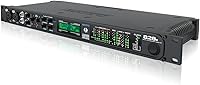

MOTU 828x 28x30 Thunderbolt USB 2.0 Audio Interface — image 1

MOTU 828x 28x30 Thunderbolt USB 2.0 Audio Interface — image 2
MOTU 828x 28x30 Thunderbolt USB 2.0 Audio Interface — image 3
MOTU 828x 28x30 Thunderbolt USB 2.0 Audio Interface — image 4
84%

Overview

The MOTU 828x 28x30 Thunderbolt USB 2.0 Audio Interface offers powerful connectivity for both Mac and PC, making it ideal for professional audio production. With 28 inputs and 30 outputs, this interface provides the flexibility needed for a variety of setups, from home studios to large-scale live performances. Users will find it convenient for both recording and mixing, with options for seamless integration with MOTU's CueMix FX software. Whether you're a seasoned audio engineer or a budding content creator, this audio interface brings the right features to elevate your sound quality and production workflow.

Features & Benefits

This audio interface stands out with its impressive 8 TRS inputs and outputs, offering ample routing flexibility for any project. The two built-in microphone preamps deliver clear, detailed sound, crucial for high-quality recordings. Onboard DSP effects allow for real-time processing, making it ideal for mixing during live setups. Connectivity is also a major strength, with both Thunderbolt and USB 2.0 options, ensuring smooth data transfer regardless of your system. These features make it a versatile tool for anyone needing a high-performing audio interface in their studio or live environment.

Best For

The MOTU 828x is best suited for music producers, sound engineers, and audio professionals looking for a reliable, high-quality audio interface. It excels in studio environments where numerous input/output channels are necessary, and the flexibility of both Thunderbolt and USB connections makes it adaptable to various setups. Users who require seamless integration with both Mac and PC will appreciate the smooth operation across different platforms. Its high I/O capacity and real-time DSP effects also make it a great option for those working with complex live audio setups or demanding recording sessions.

User Feedback

Many users praise this Thunderbolt interface for its reliability and excellent sound quality, particularly in professional settings. However, some note that the initial software installation process can be tricky for beginners, especially when setting up on certain operating systems. The onboard DSP effects receive positive feedback, with many appreciating how they simplify live mixing without needing additional hardware. Some users also highlight the flexibility of its I/O capabilities, although a few feel the size might be overkill for smaller, more compact setups.

Pros

  • This audio interface provides 28 input/output channels, making it ideal for large-scale recording and production setups.
  • The Thunderbolt and USB 2.0 connectivity options offer flexible integration with both Mac and PC environments.
  • Users appreciate the onboard DSP effects, which are particularly useful for real-time mixing during live performances.
  • It includes two built-in microphone preamps that deliver clean and detailed sound for high-quality recordings.
  • Many find the I/O flexibility helpful for managing multiple audio sources in studio environments.
  • Its robust build quality and professional-grade features make it a reliable choice for sound engineers and music producers.

Cons

  • The large size and weight of this device make it less suitable for portable or mobile setups.
  • Some users report a complex installation process, particularly for beginners unfamiliar with advanced audio interfaces.
  • While versatile, the 28x30 I/O capacity may be overwhelming for users with simpler audio needs or smaller studio spaces.
  • Its price point may be too high for casual users or those with more basic audio recording requirements.
  • The software included may have a steeper learning curve for those new to audio production or mixing.
  • This audio interface may not be the best fit for users seeking a straightforward plug-and-play experience.

Ratings

After analyzing verified user reviews worldwide, across various languages and platforms, we’ve aggregated feedback from genuine buyers of the MOTU 828x 28x30 Thunderbolt USB 2.0 Audio Interface. This evaluation reflects both the strengths and pain points highlighted by users, filtered to exclude spam, bot, or incentivized reviews. The scores below offer a comprehensive view of how this device performs in real-world scenarios, with insights from a wide range of sources and languages.

Sound Quality
93%
Users consistently praise the audio clarity and precision of this interface. The sound reproduction is particularly appreciated for its clean, detailed output, making it suitable for both professional and home studios. Whether mixing or recording, the quality stands out, with many noting how lifelike the sound feels in real-time use.
However, some users note that while the sound is excellent, the interface may not offer the same warmth as some higher-end competitors. A few users mention that the sound can be a bit too clinical for certain types of music, especially those seeking a more vintage or analog feel.
Ease of Setup
75%
25%
Many buyers find the setup process relatively straightforward, especially when using the Thunderbolt connection. The compatibility with both Mac and Windows systems simplifies the installation for a variety of setups, and MOTU's software, while robust, does offer a solid foundation for a hassle-free experience.
However, some users report frustration with the software installation, particularly on Windows. A few also point out that the manual could be clearer, and additional troubleshooting steps may be required to ensure proper connection and recognition by the system, especially for beginners.
Input/Output Flexibility
90%
This audio interface's versatility is a standout feature, with multiple inputs and outputs that allow for complex routing and configuration. The eight TRS inputs and outputs offer a wide range of connectivity options, ideal for users with diverse equipment. This flexibility is appreciated by sound engineers and musicians who require a high I/O capacity for their projects.
While the I/O flexibility is a major strength, some users with smaller setups or limited space find it overkill. Additionally, a few have mentioned that while the inputs and outputs are plentiful, they may not all be necessary for users with simpler needs, leading to unused connections.
Connectivity Options
88%
The combination of Thunderbolt and USB 2.0 options provides users with significant setup flexibility, allowing for quick integration into various studio environments. Many appreciate the speed and reliability of Thunderbolt for demanding projects, while USB 2.0 offers a more accessible alternative for those with older hardware or limited ports.
Some users find the dual connectivity options a bit confusing at first, especially when deciding between Thunderbolt and USB. A few also note that while Thunderbolt is faster, it requires a more recent computer to take full advantage, which can be limiting for some users with older systems.
DSP Effects Performance
80%
20%
The onboard DSP effects are a major selling point for live performances and real-time mixing. Users find the effects useful for processing audio on the fly, particularly when managing large sessions or multiple inputs. Many appreciate having these effects directly on the interface without needing additional plugins or software.
However, some users feel that the DSP effects aren't as powerful or diverse as they would like. There are occasional complaints about latency when using certain effects in live settings, and a few users wish for more customization options to better match their unique setups or preferences.
Build Quality
85%
The overall build quality of this device is solid, with a durable metal casing that feels well-suited to both studio environments and road use. Users appreciate its professional, sturdy design and the tactile feel of the controls, which help convey reliability during intense recording or mixing sessions.
While the build is generally praised, some users report that the device is on the heavier side, making it less ideal for frequent transport. A few also mention that, despite the solid build, it could benefit from more padding around the connectors to avoid wear over time from frequent plugging and unplugging.
Software Compatibility
78%
22%
The MOTU CueMix FX software that comes with the interface works well for managing settings, mixing, and routing audio. Users find it intuitive enough once set up and appreciate the ability to control multiple functions at once. The software enhances the overall usability and streamlines workflows for professional audio production.
However, there are occasional compatibility issues with certain DAWs or operating systems, leading to minor frustrations during setup. A few users mentioned that the software could use some updates to improve stability and performance, especially with newer versions of macOS and Windows.
User Interface
80%
20%
The user interface is generally considered user-friendly, with simple controls and a straightforward layout. Buyers appreciate how easy it is to manage input/output settings directly from the device, and many find the overall functionality intuitive for both beginners and professionals.
That said, some users have expressed a desire for more detailed visual feedback on the device’s interface. A few also mentioned that while the interface works well for standard uses, it could benefit from more customizable options or integration with advanced digital audio workstation (DAW) settings.
Reliability
92%
The reliability of this audio interface stands out in many reviews. Users consistently report a stable performance, even in demanding professional settings. Whether in the studio or on stage, this interface delivers solid, uninterrupted performance, making it a trusted choice for serious music producers and sound engineers.
The only downside mentioned by a few users is occasional driver conflicts, particularly with new operating system updates. These issues are rare but can cause minor headaches for users who are not familiar with troubleshooting driver-related problems.
Value for Money
85%
Many users find that the MOTU 828x offers great value for the features it provides, especially given its high I/O capacity and professional-grade sound quality. The price point is competitive when compared to similar interfaces, and the inclusion of DSP effects and flexible connectivity options make it a strong option for its class.
However, some users feel that the price may be a bit steep for those who do not need all the advanced features. Those with simpler needs or smaller studios might not get the full value of the interface, making it less cost-effective for certain users.
Latency
87%
Users find the latency of this audio interface to be minimal, with many appreciating the near-zero delay during both recording and playback. This is especially important for live recording setups, where timing is critical. The device's ability to handle low-latency audio streams is a key reason why many choose this interface for high-performance applications.
However, some users report experiencing occasional latency spikes when using more complex setups or multiple tracks. These spikes may not be noticeable in all cases, but they can be frustrating for users who require consistent low-latency performance for professional work.
Portability
70%
30%
The MOTU 828x is a reliable device with solid construction, but it's generally better suited for studio use than mobile setups. For those who prefer a stationary setup, the size and weight aren't much of an issue, and the durability of the interface makes it easy to integrate into larger studio environments.
On the downside, the device is relatively large and heavy, making it less ideal for frequent transportation. Users who need a more portable audio interface for gigs or travel may find it cumbersome and opt for smaller, lighter models.

Suitable for:

The MOTU 828x 28x30 Thunderbolt USB 2.0 Audio Interface is ideal for professional musicians, sound engineers, and content creators who need a high-performance audio interface with robust I/O capabilities. With eight TRS inputs and outputs, this device is perfect for studio environments where multiple channels are essential. It's also an excellent choice for users who rely on real-time mixing and DSP effects during live performances. Whether you're producing intricate tracks, managing large recordings, or performing on stage, this audio interface offers the necessary flexibility and sound quality to handle demanding tasks. The seamless compatibility with both Mac and PC ensures smooth integration into diverse setups, making it a versatile option for various production workflows.

Not suitable for:

This audio interface may not be the best choice for users with limited space or those seeking portability. Its large size and weight, along with its advanced feature set, make it more suited for permanent studio setups rather than mobile use. Additionally, those with simpler audio needs or smaller home studios may find the 28x30 I/O capacity excessive, as they may not need all the available connections. Some users also report difficulties with the software installation process, especially beginners who might struggle with configuring the system. If you're looking for a more straightforward, entry-level interface without the complexity of professional-grade features, this product may feel overwhelming or unnecessary.

Specifications

  • Inputs: 8 TRS inputs for versatile audio routing, allowing multiple audio sources to be connected simultaneously.
  • Outputs: 8 TRS outputs and 2 XLR outputs, providing flexible options for sending audio to external equipment.
  • Channels: 28x30 channel configuration, offering high I/O capacity for complex audio routing and multi-track recording.
  • Preamps: Two built-in microphone preamps designed to deliver clean, detailed sound for professional recordings.
  • DSP Effects: Onboard DSP effects for real-time mixing and processing, enhancing audio performance without requiring external software.
  • Connectivity: Supports Thunderbolt and USB 2.0 connectivity options, ensuring compatibility with both modern and legacy systems.
  • Software Support: Compatible with MOTU CueMix FX software for efficient mixing, monitoring, and processing control.
  • Compatibility: Fully compatible with macOS and Windows operating systems, allowing use across multiple platforms.
  • Dimensions: Measures 23.5 x 11.3 x 5.5 inches, making it a compact yet feature-rich audio interface suitable for studio and home setups.
  • Weight: Weighs approximately 5.94 pounds, ensuring stability during use but making it less portable for on-the-go setups.
  • Form Factor: Rackmountable design, ideal for professional studios or fixed setups where space efficiency is important.
  • Latency: Low-latency operation, providing minimal delay for real-time monitoring and recording during music production or live performance.
  • Power Supply: Powered via external AC adapter, ensuring reliable operation across various power environments.
  • Driver Support: Supports both ASIO and Core Audio drivers for seamless integration with most DAWs and professional software.
  • Microphone Input Gain: Adjustable microphone input gain for precise control over audio capture levels, ideal for various recording scenarios.
  • Monitor Outputs: Dedicated monitor outputs for optimal monitoring during both recording and mixing processes.

FAQ

This audio interface is designed with high I/O capacity (28 input/output channels), making it ideal for large-scale recording and production environments. It supports both Thunderbolt and USB 2.0 connectivity, offering flexibility for both Mac and PC setups, while also providing clean sound through built-in microphone preamps and onboard DSP effects.

To set up this device, connect it to your Mac or PC using the Thunderbolt or USB 2.0 cable, depending on your system. Once connected, install the necessary drivers and MOTU CueMix FX software, which is included. After installation, you can start routing audio inputs and outputs for your studio setup.

The MOTU 828x is compatible with MOTU's CueMix FX software, which allows for mixing, monitoring, and processing of your audio in real time. Additionally, it supports most professional DAWs on both macOS and Windows platforms, making it versatile for various music production and engineering needs.

Yes, many users report that the onboard DSP effects and flexible I/O options make the MOTU 828x a solid choice for live setups. The real-time mixing and processing features enable you to adjust sound on the fly during performances, while the device's high I/O capacity accommodates multiple microphones and instruments.

The MOTU 828x comes with two built-in microphone preamps, which provide clean and detailed sound for your recordings. These preamps are ideal for capturing vocals, instruments, or other audio sources in a studio environment.

Yes, this audio interface works with both macOS and Windows systems, offering flexible compatibility for a wide range of users. Whether you're using a Mac or a PC, the device supports seamless integration with your setup, including the necessary software for monitoring and mixing.

Thunderbolt offers faster data transfer speeds compared to USB 2.0, which is especially useful when handling multiple audio streams or high-quality recordings. While USB 2.0 is more widely available and works well for most setups, Thunderbolt provides better performance for professional environments requiring low latency and higher throughput.

Some users have reported that the installation process can be complex for beginners, especially when configuring the software and drivers. However, once set up, the interface is fairly intuitive to use for professionals, and online resources can help with the initial setup.

The MOTU 828x measures 23.5 x 11.3 x 5.5 inches and weighs approximately 5.94 pounds. It is a relatively large and heavy device, which may not be the most portable option for users who need to move their gear frequently.

This audio interface is ideal for music producers, sound engineers, and content creators who require high I/O capacity for large studio environments or complex recordings. It's perfect for professional studios or live setups that need flexible audio routing, real-time processing, and the ability to handle multiple audio inputs simultaneously.