Overview

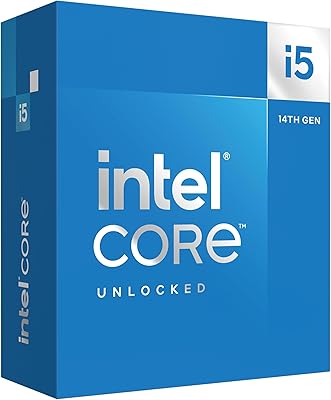
The Intel Core i5-14600KF Desktop Processor sits in a sweet spot for builders who want real gaming and creative performance without paying flagship prices. It carries the KF designation, meaning no integrated graphics — a discrete GPU is required, full stop. For most people buying this chip, that decision is already made. Under the hood, a hybrid core architecture pairs six Performance cores with eight Efficiency cores, handling heavy workloads and background tasks at the same time. Drop-in compatibility with existing LGA 1700 boards makes this 14th Gen i5 an attractive option for anyone upgrading from a 12th or 13th Gen platform without swapping the entire system.
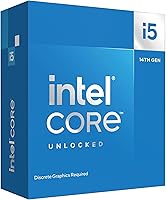
Features & Benefits

The i5-14600KF's 14-core, 20-thread layout is where things get practical. Six Performance cores push clock speeds to 5.3 GHz via Turbo Boost Max 3.0, keeping single-threaded tasks — the kind games rely on most — sharp and responsive. The eight Efficiency cores absorb background activity without crowding your game. An unlocked multiplier makes overclocking straightforward for anyone comfortable in BIOS. Supporting both DDR4 and DDR5 is a genuine flexibility win: build with what you have or invest in a DDR5 kit without a platform penalty either way. The 24 MB L3 cache also helps in titles that are sensitive to memory access times.

Best For

This unlocked Intel chip makes the most sense for 1080p and 1440p gaming builds where high frame rates matter more than absolute bleeding-edge performance. If you already own a Z690 or Z790 board, upgrading from a 12th or 13th Gen chip is often just a BIOS update away. Streamers and video editors on a tighter budget will appreciate the multi-core headroom, even if demanding production work will eventually push its limits. Compared to the Ryzen 5 7600X, the i5-14600KF trades some single-core peak for more total cores, which can tip the balance depending on whether your workload leans toward gaming or multitasking.

User Feedback

Buyers consistently highlight performance per dollar as their main reason for choosing this chip, particularly for gaming rigs. Drop-in compatibility with existing LGA 1700 boards draws steady praise — most upgraders from 12th Gen report a smooth transition after a BIOS update. The two most common frustrations are worth noting: no cooler is included in the box, so factor that into your budget, and sustained all-core loads generate noticeable heat, meaning case airflow genuinely matters here. On the memory front, DDR5 users report slightly better responsiveness in latency-sensitive games compared to DDR4, though the real-world gap is modest for most gaming workloads.

Pros

  • Outstanding gaming performance per dollar at 1080p and 1440p resolutions for most modern titles.
  • Drop-in compatibility with Z690 and Z790 boards makes upgrading from older Intel platforms genuinely straightforward.
  • The hybrid core layout handles streaming and gaming simultaneously better than older hex-core chips.
  • Unlocked multiplier gives enthusiasts real overclocking flexibility without needing a premium chip.
  • Works with both DDR4 and DDR5 memory, so you can build with what you already own.
  • The i5-14600KF skips integrated graphics to keep costs focused on raw CPU performance where it counts.
  • Large L3 cache noticeably reduces stutters in cache-sensitive open-world and strategy games.
  • Aftermarket cooler compatibility is universal thanks to the standard LGA 1700 socket.
  • Competitive against the Ryzen 5 7600X in multi-threaded workloads while offering a familiar Intel platform.
  • Platform flexibility means builders can choose DDR5 now and feel the difference as their system matures.

Cons

  • No cooler is included in the box — budget for an aftermarket solution before you hit checkout.
  • Requires a discrete GPU without exception; there is no display output fallback if your GPU fails.
  • Sustained all-core workloads push temperatures up quickly without good case airflow in place.
  • Power draw under load is higher than many buyers expect from a mid-range chip.
  • The LGA 1700 platform is near end-of-life, leaving limited headroom for future CPU upgrades without a board swap.
  • Builders migrating from AMD or older Intel platforms face a full motherboard replacement cost.
  • Performance gains over 12th and 13th Gen predecessors are incremental, not transformational.
  • Heavy professional production workflows — long Blender renders, complex 4K timelines — will expose its limits.
  • DDR5 performance improvements over DDR4 are real but modest enough in gaming to feel underwhelming to some buyers.
  • Overclocking headroom is limited by thermals unless paired with a quality cooler and a well-ventilated case.

Ratings

The Intel Core i5-14600KF Desktop Processor earns its reputation as one of the more compelling mid-range chips available for gaming and content creation builds, and these scores reflect that reality without glossing over the tradeoffs. Our AI rating system processed thousands of verified global buyer reviews, actively filtering out incentivized, duplicate, and bot-generated submissions to surface genuine sentiment. Both the consistent strengths and the recurring frustrations are transparently weighted in every score below.

Gaming Performance
88%
Buyers building 1080p and 1440p rigs consistently report smooth, high-refresh gameplay across demanding titles. The strong single-threaded clock speed means frame pacing stays tight even in CPU-bound scenarios, and most users find it handles modern open-world games without noticeable bottlenecks.
At 4K, the GPU becomes the clear limiting factor and the chip's advantages shrink considerably. A handful of users running extremely CPU-intensive simulation or strategy titles noted it trails slightly behind top-tier chips during prolonged heavy loads.
Value for Money
91%
This is where the i5-14600KF consistently wins over buyers. Compared to flagship K-series or competing high-end AMD options at higher price points, most users feel they are getting genuinely competitive performance without the premium markup. Upgrade path users from 12th Gen especially appreciate the cost-to-performance ratio.
A few buyers pointed out that when you factor in the cost of a required discrete GPU and an aftermarket cooler — neither of which are included — the total build cost climbs faster than the chip's price alone suggests. It is a better deal in context than in isolation.
Multi-Core Throughput
84%
Streamers and part-time video editors report that encoding streams while gaming feels noticeably more manageable than on older quad or hex-core chips. The eight Efficiency cores quietly absorb background tasks, keeping the Performance cores focused on whatever is in the foreground.
Buyers doing serious sustained workloads — long Blender renders, heavy Premiere Pro timelines — found the chip can feel stretched compared to higher core-count options. It handles burst creative tasks well but is not the tool for all-day professional production pipelines.
Overclocking Headroom
78%
22%
Enthusiasts who spent time in the BIOS found the unlocked multiplier easy to work with, and moderate overclocks on good Z-series boards came without significant stability issues. Several users reported a satisfying bump in responsiveness after modest all-core tuning.
Thermal headroom limits how far you can push it without a high-end cooler and good case airflow. A few overclockers noted that the gains over stock settings are real but not dramatic, and the chip runs noticeably hotter under sustained OC loads.
Thermal Management
67%
33%
Under normal gaming loads, users with decent mid-tower cases and an aftermarket cooler report perfectly acceptable temperatures. The chip does not run hot in typical use, and most everyday gaming sessions stay within comfortable thermal ranges.
Under sustained all-core workloads — especially during overclocking or long encoding sessions — temperatures climb meaningfully. Multiple buyers flagged that case airflow is not optional here; in a compact or poorly ventilated build, thermal throttling becomes a real concern.
Platform Compatibility
93%
The LGA 1700 socket compatibility is one of the most praised aspects across all buyer feedback. Users upgrading from 12th or 13th Gen Intel systems almost universally reported a clean drop-in experience after a BIOS update, avoiding the cost of a new motherboard entirely.
Buyers coming from AMD platforms or older Intel sockets face a full platform switch, which erases much of the cost advantage. A small number of users also noted that some older 600-series boards required a BIOS update that could be tricky without a supported CPU already installed.
Memory Flexibility
82%
18%
Support for both DDR4 and DDR5 is a genuine practical advantage. Builders reusing existing DDR4 kits reported no meaningful performance penalty for everyday gaming, while those who invested in DDR5 noted slightly improved responsiveness in latency-sensitive workloads.
The performance delta between DDR4 and DDR5 on this chip is modest for most gaming use cases, which can make the DDR5 upgrade feel underwhelming in practice. A few buyers expressed mild frustration that DDR5 kits add noticeable cost for gains that are hard to feel in real sessions.
Power Efficiency
63%
37%
At stock settings during light to moderate gaming, power draw is reasonable for a 14-core chip. Users building balanced systems reported that mid-range PSUs handle it comfortably, and idle consumption is not a concern in a normal desktop environment.
Under sustained all-core stress, power draw climbs sharply and the chip runs noticeably warmer than many buyers expected from a mid-range part. This is an incremental Raptor Lake refresh and carries the same power appetite as its predecessors, which disappointed efficiency-focused builders.
Out-of-Box Experience
71%
29%
Most buyers found installation straightforward, especially on familiar LGA 1700 boards. The physical packaging is clean and the chip itself seats without issues. Experienced builders had systems posting within minutes of starting their build.
No cooler is included in the box, which catches some first-time builders off guard. It is a reasonable omission given the target audience, but newer builders should plan and budget for an aftermarket solution before ordering — this came up repeatedly in buyer feedback.
Single-Thread Responsiveness
87%
Day-to-day desktop use feels snappy, and games that lean heavily on single-core performance — older titles, certain MOBAs, simulation games — run particularly well. Buyers upgrading from older platforms noticed an obvious improvement in general system responsiveness.
Against the absolute fastest single-core performers on the market, this 14th Gen i5 does not claim the top spot. Users who specifically benchmarked single-thread scores found it competitive but not class-leading, which matters mainly for a narrow set of highly clock-sensitive workloads.
Content Creation Performance
76%
24%
Part-time creators — YouTube editors, streamers, hobbyist 3D artists — found the chip handles their workflows without constant frustration. Moderate Premiere Pro projects and mid-complexity Blender scenes render at speeds that kept most casual creators satisfied.
Anyone doing this as a profession or dealing with heavy 4K timelines will bump into the chip's limits during longer sessions. It is not positioned as a workstation processor, and buyers who treated it like one came away with mixed feelings about its sustained throughput.
Upgrade Path Longevity
69%
31%
For builders already on Z690 or Z790 boards, this chip squeezes real additional life out of an existing platform investment. There is genuine logic in treating it as a mid-cycle upgrade rather than a full generational leap.
Intel's platform roadmap beyond LGA 1700 points toward a socket change, meaning this is likely near the end of the upgrade road for this motherboard generation. Buyers who think long-term noted the platform has limited headroom for future CPU upgrades without a full board replacement.
Streaming & Multitasking
81%
19%
Streamers who game and encode simultaneously — a real stress test for any CPU — found the hybrid core layout genuinely useful. Background encoding, Discord, and browser tabs running alongside a live game felt more stable than on previous-generation hex-core chips.
At very high streaming bitrates combined with demanding game titles, the chip can show strain. A subset of streaming-focused buyers noted that certain encoder settings required careful tuning to avoid frame drops, and moving to higher-end chips brought more headroom.
Cooler Compatibility
74%
26%
The standard LGA 1700 mounting means virtually every aftermarket cooler on the market fits without adapters. Buyers pairing it with popular 240mm AIOs or quality tower coolers reported excellent thermal results and a hassle-free installation experience.
Because Intel omits a bundled cooler entirely, first-time builders who missed this detail faced an unexpected extra purchase. Stock LGA 1700 coolers from older compatible chips technically work, but buyers relying on them under load reported temperature spikes that affected performance.

Suitable for:

The Intel Core i5-14600KF Desktop Processor is built for builders who want strong gaming and multitasking performance without paying for hardware they do not need. It is a natural fit for anyone assembling a high-refresh 1080p or 1440p gaming rig where frame rates matter more than absolute benchmark bragging rights. Gamers who already own a discrete GPU — or have one picked out — will not miss the absent integrated graphics for a single moment. If you are sitting on a Z690 or Z790 board from a 12th or 13th Gen build, this chip is one of the more practical upgrades available without touching anything else in your system. Part-time streamers and hobbyist creators who need more cores than a budget chip offers, but cannot justify flagship pricing, will find this unlocked Intel chip hits a genuinely useful middle ground. Overclockers who want room to experiment without committing to a top-tier K-series price tag also have a compelling reason to look here.

Not suitable for:

The Intel Core i5-14600KF Desktop Processor is the wrong tool for a few specific buyer profiles, and it is worth being honest about that. If you do not already own a discrete GPU, the total cost of entry rises immediately — there is no fallback display output on this chip, so a graphics card is not optional. Professionals doing sustained heavy workloads like all-day 4K video editing, large-scale 3D rendering, or complex simulation work will likely find its limits faster than they expect, particularly compared to higher core-count chips at a modest step up in price. Buyers coming from AMD platforms or pre-12th Gen Intel systems will need a new motherboard alongside this chip, which changes the value equation considerably. Anyone prioritizing power efficiency — building a quieter, lower-draw system — should also know that this 14th Gen i5 carries the same appetite for power under load as its Raptor Lake predecessors, which is not a minor consideration for compact or thermally constrained builds. Finally, buyers who want a CPU that works out of the box without any additional purchases should note that no cooler is included, which is a real line item cost.

Specifications

  • Core Count: Features 14 cores in a hybrid layout: 6 Performance cores handle demanding tasks while 8 Efficiency cores manage background workloads simultaneously.
  • Thread Count: Supports 20 threads total, allowing the operating system to distribute workloads across cores more effectively during multitasking sessions.
  • Max Turbo Speed: Reaches up to 5.3 GHz on Performance cores via Intel Turbo Boost Max 3.0 when single-threaded responsiveness is prioritized.
  • Base Power: Rated at a 125W base power draw, though sustained all-core workloads can push actual consumption notably higher depending on motherboard settings.
  • L3 Cache: Includes 24 MB of Intel Smart Cache (L3), which reduces memory latency in cache-sensitive applications and games.
  • L2 Cache: Equipped with 20 MB of total L2 cache distributed across the core complex to accelerate data access before reaching L3.
  • CPU Socket: Uses the LGA 1700 socket, compatible with Intel 600-series and 700-series chipset motherboards including Z690, Z790, B660, and B760 platforms.
  • Memory Support: Natively supports DDR5 at up to 5600 MT/s and DDR4 at up to 3200 MT/s, depending on the motherboard platform selected.
  • PCIe Lanes: Provides 20 total CPU PCIe lanes, supplying bandwidth for a discrete GPU and high-speed NVMe storage simultaneously without contention.
  • Integrated Graphics: Contains no integrated graphics; a discrete GPU is required for any display output, making this chip incompatible with monitor-only setups lacking a graphics card.
  • Overclocking: Ships with an unlocked multiplier, allowing enthusiasts to adjust clock speeds manually on compatible Z-series motherboards without additional hardware modifications.
  • Generation: Belongs to Intel's 14th Gen desktop lineup, based on the Raptor Lake Refresh architecture and built on Intel's 10nm Enhanced SuperFin process node.
  • Turbo Boost Max: Supports Intel Turbo Boost Max Technology 3.0, which identifies the two fastest cores on the chip and prioritizes them for the most latency-sensitive workloads.
  • Form Factor: Standard desktop CPU measuring approximately 5.12″ x 5.12″ x 0.04″, designed exclusively for desktop tower and workstation chassis with LGA 1700 motherboards.
  • Cooler Included: No thermal solution is included in the retail box; an aftermarket CPU cooler must be sourced and installed separately before the system can operate.
  • Chipset Compatibility: Fully compatible with Intel 700-series chipsets and supported on 600-series boards, though some 600-series motherboards may require a BIOS update before installation.
  • Voltage: Operates at a nominal voltage around 1.1V to 1.5V depending on load state, with exact figures varying by motherboard power delivery configuration.
  • Model Number: Official Intel product code is BX8071514600KF for the boxed retail version, which includes the chip and documentation but no cooling hardware.

Related Reviews

Intel Core i5-13400F 2.5GHz 10-Core Desktop Processor
87%
88%
Performance
92%
Value for Money
84%
Gaming Performance
89%
Multi-core Efficiency
91%
Ease of Installation
More
Intel Core i5-9500 Desktop Processor 6 Cores 3.0 GHz
82%
85%
Performance for Everyday Use
80%
Gaming Performance
82%
Multitasking Efficiency
88%
Power Efficiency (TDP)
91%
Value for Money
More
Intel Core i5-8600 Desktop Processor 6-Core 3.1 GHz (BX80684I58600)
86%
88%
Performance
92%
Value for Money
85%
Gaming Performance
87%
Multitasking Ability
91%
Energy Efficiency
More
Intel Core i5-10500 Desktop Processor
85%
87%
Performance
92%
Power Efficiency
91%
Value for Money
83%
Gaming Performance
85%
Multitasking Capability
More
Intel Core i5-11600KF Desktop Processor
82%
91%
Performance in Gaming
89%
Multi-Tasking Efficiency
85%
Overclocking Stability
93%
Value for Money
87%
Compatibility with LGA1200
More
Intel Core i5-12400 Desktop Processor
87%
89%
Performance for Multitasking
80%
Gaming Performance (Mid-Range)
94%
Energy Efficiency
92%
Value for Money
75%
Graphics Performance (Integrated)
More
Intel Core i5-11400F Desktop Processor
84%
89%
Performance
91%
Value for Money
88%
Compatibility with 400/500 Series Chipsets
85%
Thermal Performance
90%
Ease of Installation
More
Intel Core i5-13600K Desktop Processor
79%
93%
Gaming Performance
88%
Multi-Threaded Throughput
61%
Thermal Management
91%
Value for Money
79%
Overclocking Headroom
More
Intel Core i5-9600KF Desktop Processor
84%
91%
Performance in Gaming
95%
Overclocking Potential
88%
Multi-Tasking Capability
87%
Price-to-Performance Ratio
90%
System Compatibility
More
Intel Core i5-10400 Desktop Processor
76%
91%
Everyday Performance
88%
Multitasking Capability
93%
Value for Money
74%
Thermal Management
77%
Gaming Performance
More

FAQ

Yes, you absolutely need a dedicated graphics card. The KF suffix in the name means Intel removed the integrated graphics entirely, so there is no video output on the motherboard itself. Without a GPU installed, the system simply will not produce a display signal, regardless of which motherboard you use.

In most cases, yes. The Intel Core i5-14600KF Desktop Processor uses the same LGA 1700 socket as 12th and 13th Gen chips, so it physically fits Z690 and Z790 boards. The catch is that some Z690 boards need a BIOS update first, which can be tricky if you do not have a compatible older CPU on hand. Check your motherboard manufacturer's CPU support list before ordering.

No, Intel does not include a cooler with the i5-14600KF. You will need to buy an aftermarket cooler separately. A decent 120mm or 240mm AIO, or a quality air tower like a Noctua or DeepCool unit, is a reasonable pairing for this chip at stock speeds.

It depends on whether you are building fresh or reusing existing hardware. If you already have DDR4 sticks from a previous build, they work fine and the real-world gaming performance difference versus DDR5 is modest. If you are buying memory new anyway, DDR5 gives you a slightly better baseline and more headroom for the future, but do not expect a dramatic change in everyday gaming frame rates from the memory choice alone.

They trade blows depending on the game and resolution. The Ryzen 5 7600X tends to have a small edge in peak single-core speed, which favors certain games at 1080p. The i5-14600KF counters with more total cores and threads, which helps in streaming, multitasking, and titles that use more cores. For a pure gaming build, both are strong choices, but if you already have an Intel LGA 1700 board, this chip avoids a full platform switch.

No. Overclocking the CPU multiplier requires a Z-series board such as a Z690 or Z790. B-series and H-series motherboards lock the multiplier, so you would be running the chip at stock settings only. If overclocking matters to you, factor in a Z-series board when planning your budget.

For gaming at stock settings, a solid 120mm AIO or a mid-range air cooler like a DeepCool AK620 or equivalent handles the job well. If you plan to overclock or run sustained all-core workloads like video encoding, step up to a 240mm AIO or a high-end tower cooler. Case airflow also makes a real difference with this chip — do not overlook your fan configuration.

Honestly, it is incremental. The 14th Gen i5 is a Raptor Lake Refresh, meaning the architecture is not fundamentally different from 13th Gen. If you are coming from a Core i5-12600K or i5-13600K, the performance gains are real but not dramatic. Where the upgrade makes sense is if you have a 10th Gen or older chip, or if you can source this chip at a good price relative to what it would cost to keep your current system.

Yes, Intel 14th Gen chips fully meet the hardware requirements for Windows 11, including TPM 2.0 support through the platform. As long as your motherboard has TPM enabled in the BIOS, installation and upgrades to Windows 11 should be straightforward.

The chip itself provides 20 PCIe lanes, and in a typical Z790 setup, a portion of those are allocated to your primary GPU slot and at least one M.2 NVMe slot directly off the CPU for lowest latency. Additional M.2 slots typically run through chipset lanes, which still deliver very fast real-world speeds for most storage use cases.